

You need five things to start recording today: a computer, a DAW, an audio interface, a microphone, and a pair of closed-back headphones. Pick the quietest room in your home, connect the interface to your computer and the microphone to the interface, and you’re already recording. A realistic starter budget sits around £300 to £500, and the smartest early spend isn’t a better microphone. It’s acoustic treatment.
- Acoustic treatment, especially at first reflection points and room corners, offers more noticeable improvement than upgrading microphones or monitors in untreated spaces.
- Proper gain staging, connection order, and room calibration are essential to avoid common issues like clipping, latency, and inaccurate sound.
- Starting with a dynamic microphone in a treated room and a basic interface under £500 delivers better results than a high-end microphone in an untreated environment.
- Using a small, soft-furnished space like a bedroom or closet can outperform larger, echoey rooms for vocal recordings.
- Upgrading gear should be done gradually, prioritizing room treatment and correct setup to maximize sound quality without overspending.
Table of Contents
- How to set up a recording studio: the essential kit explained
- Choosing and preparing a room for your recording studio setup
- Acoustic treatment fundamentals: what to fix first
- Signal chain and gear selection: connections and gain staging
- Step-by-step setup checklist for your first recording session
- Monitoring and mixing basics: headphones, monitors, and when to upgrade
- Budget builds and prioritisation: what to buy at each stage
- Common mistakes and quick troubleshooting fixes
- Detailed microphone types and placement for vocals and instruments
- Signal flow and routing inside your DAW and hardware
- Calibrating your monitoring levels and correcting for your room
- Why the room matters more than the gear list
- Getting your first setup right with Musicstreet
- Sources
- FAQ
How to set up a recording studio: the essential kit explained
Every home studio runs on the same signal chain, and understanding what each link does stops you from wasting money on the wrong upgrade. Sound travels from source to microphone, microphone to interface, interface to computer, computer to your ears. Weakness anywhere in that chain drags everything else down with it.
Your computer doesn’t need to be new or expensive. Most laptops from the last five years handle recording software fine, provided you’re not running dozens of virtual instruments at once. The real decision is your Digital Audio Workstation, or DAW, the software where you record, edit, and mix. Reaper, GarageBand, and Ableton Live all do the job. Pick one and learn it properly rather than hopping between three half-understood programs. Depth with one tool beats surface familiarity with several.
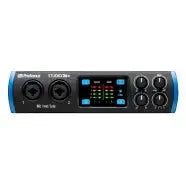
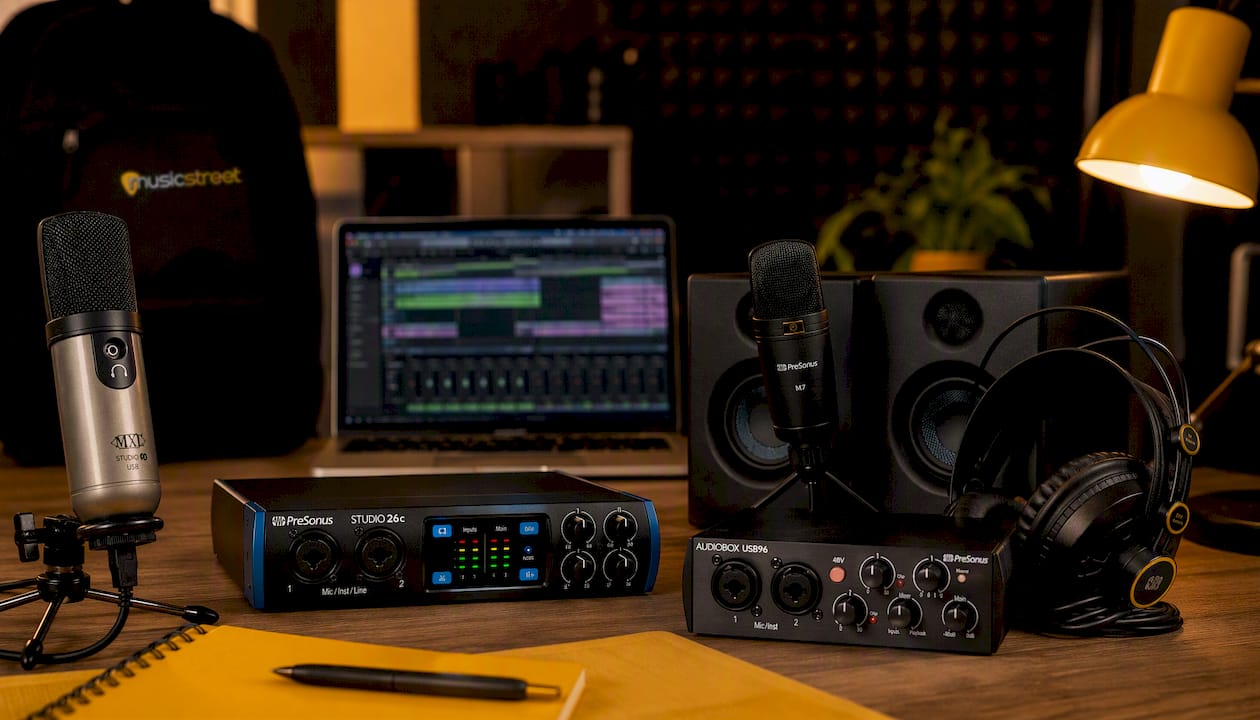
The audio interface deserves your first serious spend. It converts the analogue signal from your microphone or guitar into digital audio your computer can process, and preamp quality and driver stability affect every recording you make. A cheap interface with unstable drivers will haunt you with crackling, dropouts, and latency no amount of software tweaking fixes. One or two inputs is plenty for solo work.
Microphone choice depends on what you’re recording. A dynamic microphone handles loud sources and untreated rooms well, because it rejects more background noise and room reflections than a condenser does. A condenser microphone captures more detail and is often the better pick for vocals or acoustic instruments, but it’s less forgiving of a noisy or untreated space. If your room isn’t treated yet, start with a dynamic.
For monitoring while you track, closed-back headphones are the right call. They stop the sound from bleeding back into your microphone, something open-back headphones and speakers can’t manage. Save monitor speakers for later, once your room has some acoustic treatment in place.
A handful of accessories matter more than beginners expect:
- A decent XLR cable, since a cheap one is a common source of hum and dropouts.
- A solid mic stand, so your recordings don’t wobble every time you shift position.
- A pop filter, which cuts the plosive blasts that ruin vocal takes.
- A surge protector, to keep your gear safe from a dodgy socket.
If you’re recording guitar rather than vocals, keeping your instrument properly set up matters just as much as your mic choice. Musicstreet’s studio recording equipment essentials guide covers the basics in more depth, and a compact kit like the CruzTools Groovetech Guitar Player Tech Kit keeps your action, intonation, and string height consistent between takes, which matters when you’re chasing a clean recorded tone.
Choosing and preparing a room for your recording studio setup
The room you record in shapes your sound more than almost any piece of gear you buy, and the good news is that the ideal choice for a beginner is usually already sitting in your home. Small, soft-furnished rooms with carpet, curtains, and clutter tend to outperform big, echoey ones, because hard parallel surfaces are what create the harsh reflections that ruin recordings. That’s why bedrooms and walk-in closets so often make better vocal booths than a spare lounge.
Here’s how to size up your options:
- Walk into each candidate room and clap once, sharply. A flat, dead sound is good; a ringing “boing” tells you the room has a flutter echo problem.
- Stand where your microphone will sit and have someone slide a small mirror along the walls at ear height. Wherever you see the microphone reflected in the mirror is a “first reflection point” and needs treatment.
- Check for background noise sources: fridges, radiators, street-facing windows, or a router fan. Move the setup or the schedule around these where you can.
- If space allows, separate your recording position from your mixing position, so your speakers aren’t picking up their own output through an open mic.
Long XLR and instrument cables help here. A 10 metre cable lets you record in the quietest corner of a room while keeping your interface and computer somewhere more convenient, and it means you’re not hunched over a laptop fan while tracking vocals.
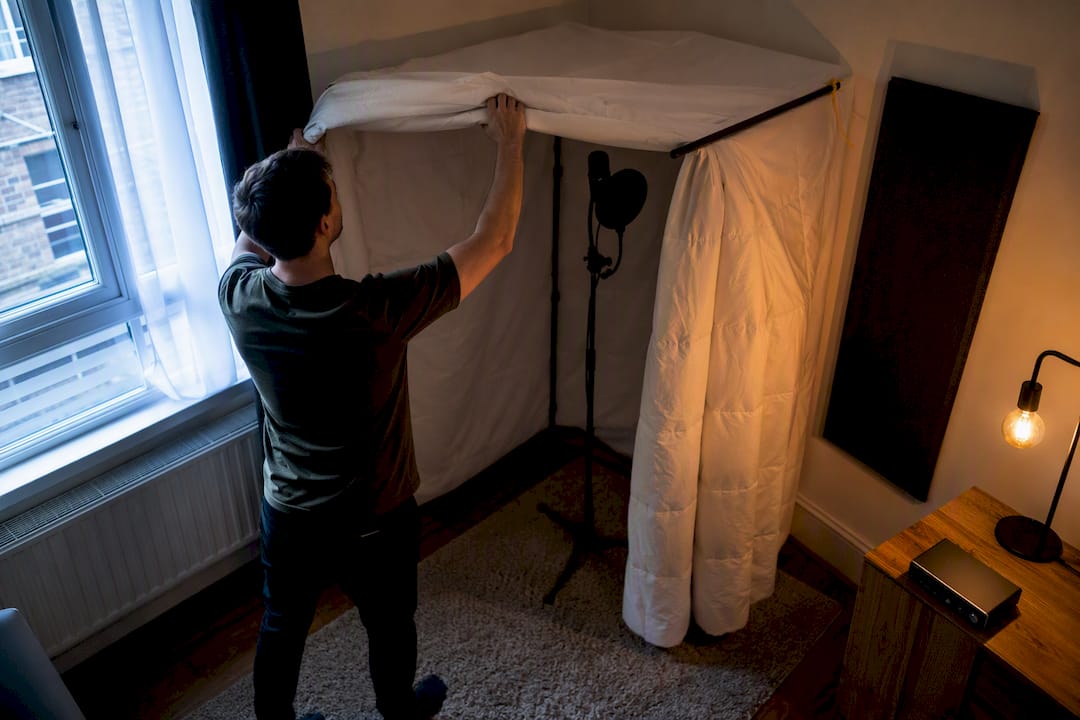
If you live in a flat or share walls with neighbours, plan around quiet hours rather than fighting them. A short conversation with the people next door about when you’ll be recording buys you far more goodwill than any soundproofing budget could. A duvet-draped clothes rail in the corner of a bedroom, or a walk-in closet packed with hanging clothes, makes a surprisingly effective makeshift vocal booth, since closets and rugs are genuinely workable solutions for small-space recording.
Acoustic treatment fundamentals: what to fix first
Room treatment consistently gives a better return than the next microphone upgrade, and it’s the step most beginners skip. Treating first reflections and bass buildup in corners outperforms spending the same money on pricier monitors or microphones when the room itself is still untreated. A brilliant microphone in a boxy, reflective room still sounds boxy and reflective.
Start with the first reflection points you identified with the mirror test. These are the spots where sound bounces off a hard wall straight back into your microphone, smearing the recording with a subtle metallic edge. A few absorption panels here make an outsized difference. Corners are next: bass frequencies pile up where walls meet, so basic bass traps in the corners tighten up low-end muddiness that no amount of EQ fixes cleanly afterwards. In smaller rooms, a “cloud” of absorptive material suspended above the mic position handles the reflections coming off the ceiling, which the mirror test on the walls alone will miss.
You don’t need commercial foam to get started. Moving blankets hung on a curtain rail, a thick rug on a hard floor, and a loaded bookshelf all scatter and absorb sound cheaply. A walk-in closet full of clothes is essentially a ready-made vocal booth. For something closer to proper treatment, rockwool slabs wrapped in fabric and framed in timber cost a fraction of branded acoustic panels and perform comparably.
- Hang moving blankets at first reflection points as a free starting fix.
- Build simple rockwool panels for corners and the ceiling cloud once budget allows.
- Use a loaded bookshelf or rug to break up flat, hard surfaces cheaply.
- Test after every change with the clap test from your room-checking routine.
If you’re mounting anything to a plasterboard wall, find the studs or use proper plasterboard fixings rated for the panel’s weight, and leave a small air gap behind rigid panels, since that gap improves low-frequency absorption noticeably compared with a panel mounted flush.
Pro Tip: Four well-placed panels and two corner bass traps will change your recordings more noticeably than trading your current microphone for one twice the price. Fix the room before you touch your gear list again.
If wall-mounted treatment still leaves you hearing traffic or footsteps through a door, the door itself is often the weak point. Interior door options built to cut noise transfer are worth a look if your recording space backs onto a hallway or a shared wall.
Signal chain and gear selection: connections and gain staging
Getting the connection order right the first time saves you an evening of troubleshooting later. Connect the interface to your computer via USB first, install the drivers before plugging anything else in, then connect your microphone via XLR, set your headphone output, and select the interface as your input and output device inside the DAW. Doing it in a different order is the single most common reason a first session grinds to a halt.
Gain staging is the next thing beginners get wrong. Turn your interface’s gain knob up while speaking or playing at normal performance volume, and aim for your loudest peaks to sit around minus 12 dBFS on the meter, not right at the top. Recording too hot causes digital clipping, an ugly, unrecoverable distortion; recording too quiet buries your signal in noise once you turn it up during mixing.
A few more details matter more than they seem to at first glance:
- Only condenser microphones need phantom power (usually a 48V switch on your interface); dynamic mics don’t, and leaving phantom power on with certain ribbon mics can damage them.
- Use the interface’s dedicated instrument input, not a mic input, when plugging a guitar in directly.
- For tracking, a sample rate of 44.1kHz or 48kHz is standard, and a small buffer size (64 to 128 samples) keeps latency low while you record.
- For mixing later, buffer size can go higher, since latency matters far less once nothing is being tracked live.
If latency between playing and hearing yourself is a problem, check whether your interface offers direct monitoring. This routes the incoming signal straight to your headphones before it touches your computer, sidestepping the processing delay entirely. Before you buy any budget interface, check the manufacturer’s support page for driver updates and confirm compatibility with your operating system, since driver issues are the most common cause of latency complaints in the first place.
Step-by-step setup checklist for your first recording session
Follow this order on day one and you’ll have a working recording chain within the hour rather than fighting settings all evening.
- Plug the interface into your computer via USB and power it on before opening any software.
- Install the manufacturer’s drivers, restarting the computer if prompted.
- Connect your microphone to the interface using an XLR cable, and plug your headphones into the interface’s headphone output.
- Open your DAW and select the interface as both the input and output device in its audio settings.
- Put on your headphones and speak into the microphone to confirm you can hear yourself.
- Set up your mic stand, angle the microphone slightly off-axis from a vocalist’s mouth to reduce plosives, and clip a pop filter a few inches in front of it.
- For guitar, position the microphone roughly where the neck meets the body, angled slightly toward the sound hole or speaker cone, and adjust by ear.
- Set your project’s sample rate (44.1kHz is a safe default) and bit depth (24 bit) before you record a single take.
- Name your project file clearly, including the date and song title, and save a backup copy somewhere other than your main hard drive.
Pro Tip: Print this checklist and keep it taped inside your gear cupboard. You’ll refer back to steps 1 to 4 every single session for the first few months, and having them physically in front of you beats hunting through browser tabs.
Keep your cabling tidy from the start: running power and audio cables at right angles to each other, securing them with Velcro ties, and labelling both ends prevents the hum and crossed-cable confusion that derails far too many first sessions.
Monitoring and mixing basics: headphones, monitors, and when to upgrade
Closed-back headphones are the right tool for tracking, because they seal out room noise and stop your own performance from bleeding back into the microphone. Monitor speakers become genuinely useful once your room has some treatment in place. Speakers reveal room problems that headphones simply can’t, so buying a pair before treating your walls means you’re mixing against a room that’s lying to you.
When you do add monitors, position them and yourself in an equilateral triangle, each speaker and your ears forming equal-length sides, roughly a third of the way into the room from the front wall where space allows. That third-of-the-room rule avoids the worst of the bass buildup that happens right up against a wall.
- Sit your monitors on isolation pads to stop vibration transferring into your desk and muddying the low end.
- Check every mix on both headphones and monitors before calling it finished, since each reveals different flaws.
- Compare your rough mix against a professionally produced reference track in the same genre.
- Take regular breaks; ears fatigue faster than most beginners expect, and a “great” mix at midnight often sounds thin by morning.
Budget builds and prioritisation: what to buy at each stage
Spending in the right order matters more than spending more. A full working signal chain, interface, microphone, headphones and DAW, can be assembled for well under £500 to £600 when you buy in the right priority. In an untreated room, a better microphone or a pair of monitors gives you a worse return than the same money spent on acoustic panels or a cleaner interface.
Starter tier, roughly £300 to £500: entry-level interface, dynamic microphone, closed-back headphones, free or budget DAW, and a handful of moving blankets for first reflections.
Balanced tier, roughly £500 to £1,000: step up to a better interface with cleaner preamps, add a condenser microphone once your room has basic treatment, and build proper rockwool panels for the corners.
Growth tier, roughly £1,000 and beyond: monitor speakers with isolation pads, a second microphone for different sources, and expanded treatment including a ceiling cloud.
Musicstreet’s guide to building a UK recording studio on a £250 to £500 budget walks through this exact prioritisation in more detail. Whatever tier you’re working in, upgrade one thing at a time and listen back before the next purchase; that’s the only way to know whether a change actually helped.
Common mistakes and quick troubleshooting fixes
Most first-session problems trace back to a handful of repeat offenders, and nearly all of them are fixable in minutes once you know what to look for.
- Clipping (distorted, crackly recordings): your input gain is too high; pull it down until peaks sit around minus 12 dBFS.
- Latency (a delay between playing and hearing yourself): lower your buffer size in the DAW, or switch on direct monitoring if your interface supports it.
- Hum or buzz: swap the XLR cable first, then check that power and audio cables aren’t running parallel to each other.
- Phase problems (thin, hollow sound with two mics): check both mics are the same distance from the source, or flip the polarity switch on one channel.
If a problem follows you between different microphones and cables, it’s usually the room or the interface driver, not the gear itself. Try a different pair of headphones and check for driver updates before assuming you need to buy anything new.
Detailed microphone types and placement for vocals and instruments
A dynamic microphone, such as the classic Shure SM57 style design, handles loud sources and imperfect rooms well, making it the safer first choice for guitar amps, snare drums, and untreated vocal booths. A condenser microphone captures far more detail and air, which flatters acoustic guitar and vocals, but it also picks up every flaw in an untreated room.
For vocals, position the microphone at mouth height, angled slightly off-axis rather than pointed straight down the throat, with a pop filter a few centimetres in front to catch plosive bursts of air. For acoustic guitar, aim the microphone toward the point where the neck joins the body, roughly a hand’s width away, rather than straight into the sound hole, which tends to produce a boomy, unbalanced tone. For an electric guitar amp, place the microphone close to the speaker cone, slightly off-centre from the middle, and experiment by ear between the centre (brighter, more aggressive) and the edge (warmer, rounder).
Drums and full-band recording introduce phase relationships between multiple microphones that beginners rarely anticipate: two mics at different distances from the same source can cancel each other’s frequencies out, producing a thin, hollow sound. Keeping microphones equidistant from a shared source, or checking a polarity-invert switch when something sounds oddly weak, resolves most of these issues without needing extra gear.
Signal flow and routing inside your DAW and hardware
Signal flow is simply the path your sound takes from the moment it hits the microphone to the moment it comes out of your speakers, and understanding it prevents most “why can’t I hear anything” moments. Sound enters the microphone, travels down the XLR cable to the interface’s preamp, gets converted from analogue to digital, and arrives in your DAW as a track ready to record.
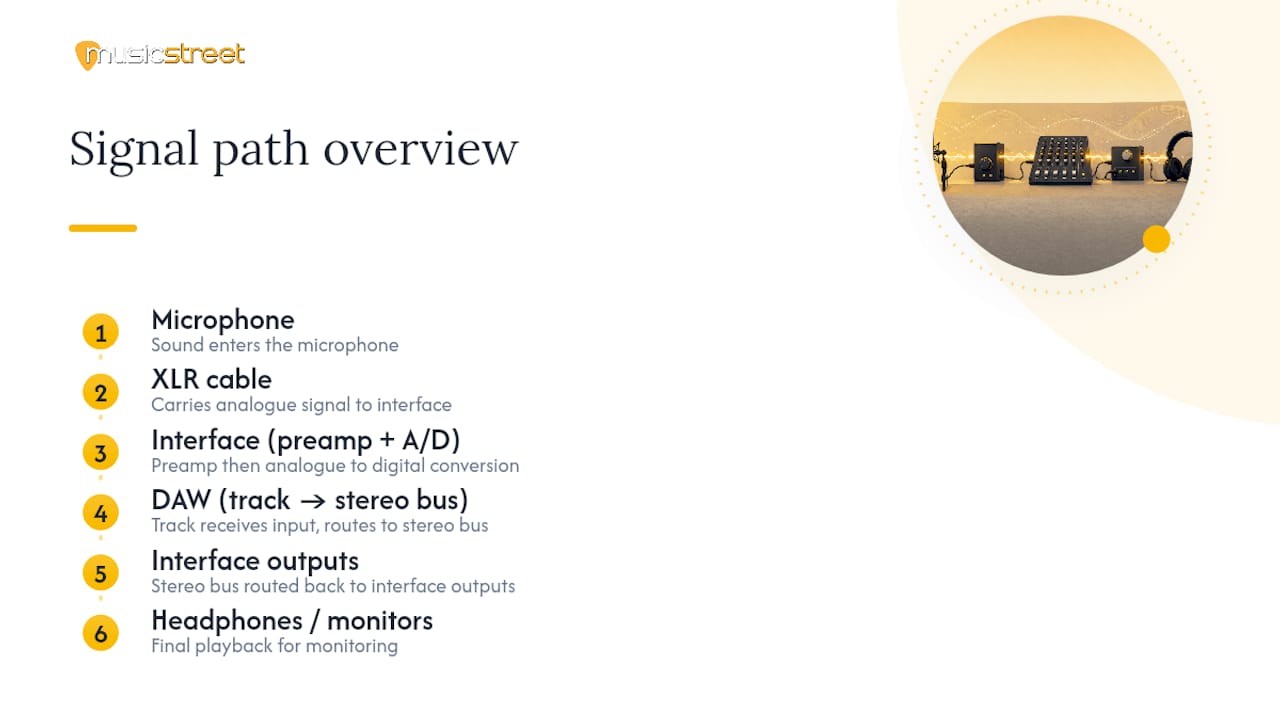
Inside the DAW, each track carries an input (where the signal comes from) and an output (where it’s sent, usually your main stereo bus, which then routes to your interface’s outputs and into your headphones or monitors). Understanding this becomes essential once you start layering: a guitar track routed through a reverb send, for instance, sends a copy of its signal to a separate effects track, which then blends back into the main mix at a level you control independently.
Externally, the same logic applies. Some interfaces offer a direct monitoring switch that routes the incoming signal straight to your headphone output before it ever reaches the computer, bypassing the DAW’s processing delay entirely, which is exactly what solves most latency complaints during tracking. Getting comfortable with this signal path, rather than treating your DAW as a mysterious black box, is what separates someone who can troubleshoot their own setup from someone stuck waiting for help every time something goes quiet.
Calibrating your monitoring levels and correcting for your room
Calibration, in a home studio context, simply means setting a consistent, known listening volume so your ears judge every mix against the same reference point rather than whatever level you happened to leave the volume knob at last time. Pick a comfortable, moderate level, mark it if your interface or monitors have a visible dial, and mix at that same level every session.
Room correction at a beginner level doesn’t need expensive measurement microphones or software. The mirror test and clap test you used to choose your room double as an ongoing diagnostic: if a mix that sounds balanced in your room sounds bass-heavy or thin on a different system, that’s a sign your room is still colouring your judgement in a specific direction, usually too much or too little bass from an untreated corner. Cross-checking mixes on headphones, in the car, and on a phone speaker catches these room-induced blind spots faster than any single piece of software.
If you want to go further, some budget-friendly measurement tools and free room analysis software exist for identifying specific problem frequencies, but they’re a step worth taking after basic treatment is in place, not before. Correction software can only compensate so much; it cannot substitute for physically absorbing the reflections and bass buildup causing the problem in the first place, which is exactly why treating the room before upgrading gear consistently pays off more.
Why the room matters more than the gear list
The conventional advice on home studios has it backwards. Most beginners are pointed toward a shopping list, upgrade the microphone, then the interface, then the monitors, when the research on this consistently shows the room itself is the biggest lever available, and it’s the cheapest one to pull.
What’s overrated is the next gear purchase. What’s underrated is a Tuesday evening spent hanging moving blankets and running a clap test. A dynamic microphone in a treated bedroom will beat a premium condenser in an untreated lounge nearly every time, and that single fact should reorder most people’s spending priorities.
If there’s one thing worth prioritising above all else, it’s getting the signal chain order right before you touch anything else: interface first, correct connection order, sensible gain staging, then treatment, then whatever microphone suits your untreated or lightly treated room. Chase that order and the recordings improve before you’ve spent another pound on gear. Chase the gear list first and you’ll spend more money arriving at the same disappointing sound.
— Music
Getting your first setup right with Musicstreet
Musicstreet is the practical next step once you’ve worked through the room, the treatment, and the signal chain covered above: a place to buy the instrument you’re actually recording, keep it properly maintained, and get hands-on advice when something in your setup isn’t behaving.
If guitar is at the centre of your recordings, a well-set-up instrument makes every microphone placement decision easier, because you’re not fighting buzzing frets or dodgy intonation while you’re trying to capture a clean take. A guitar retailer offers expert setup and inspection on every guitar sold, alongside free UK delivery on qualifying orders, so your instrument arrives ready to record rather than needing a workshop visit first. A twelve-string electric like the Gretsch G5422G-12 opens up layered acoustic-style textures without needing a second guitarist in the room, and a compact Groovetech Mini Multi-Tool keeps your setup dialled in between sessions without a trip back to the shop. Browse the current range and book an in-store consultation at Musicstreet.
Sources
- How to set up a home studio on a budget - Wisseloord
- A Beginner’s Guide To Acoustic Treatment - Sound On Sound
- Home Recording Studio Setup: What You Actually Need (And What You Don’t) - Signal
- Musicproductionwiki
FAQ
What equipment is needed for a recording studio setup?
You need a computer, a DAW, an audio interface, a microphone, and closed-back headphones. Add an XLR cable, mic stand, pop filter, and basic acoustic treatment before spending on anything else.
How do I set up a sound recording studio?
Choose the quietest available room, connect your interface to your computer via USB, install its drivers, connect your microphone via XLR, then select the interface as your input and output device inside your DAW. Treat first reflection points and corners before adding more gear.
How can I make a simple recording studio at home?
A bedroom or walk-in closet with moving blankets hung at ear height, a basic interface, a dynamic microphone, and free DAW software covers a genuinely usable simple setup. Musicstreet’s step-by-step home studio guide walks through the same process in more detail.
How much does a two-hour studio session cost?
Professional studio rates vary widely by location and equipment, so there’s no single UK-wide figure. Building your own home setup for a one-off cost of roughly £300 to £500 typically pays for itself within a handful of sessions compared with repeated professional studio hire.


Share:
Choosing the Best Guitar Amp: Expert Guide to Tube vs Solid State Amplifiers for UK Musicians
Guitar Repair Shop Huntingdon: Realistic Turnaround Times