

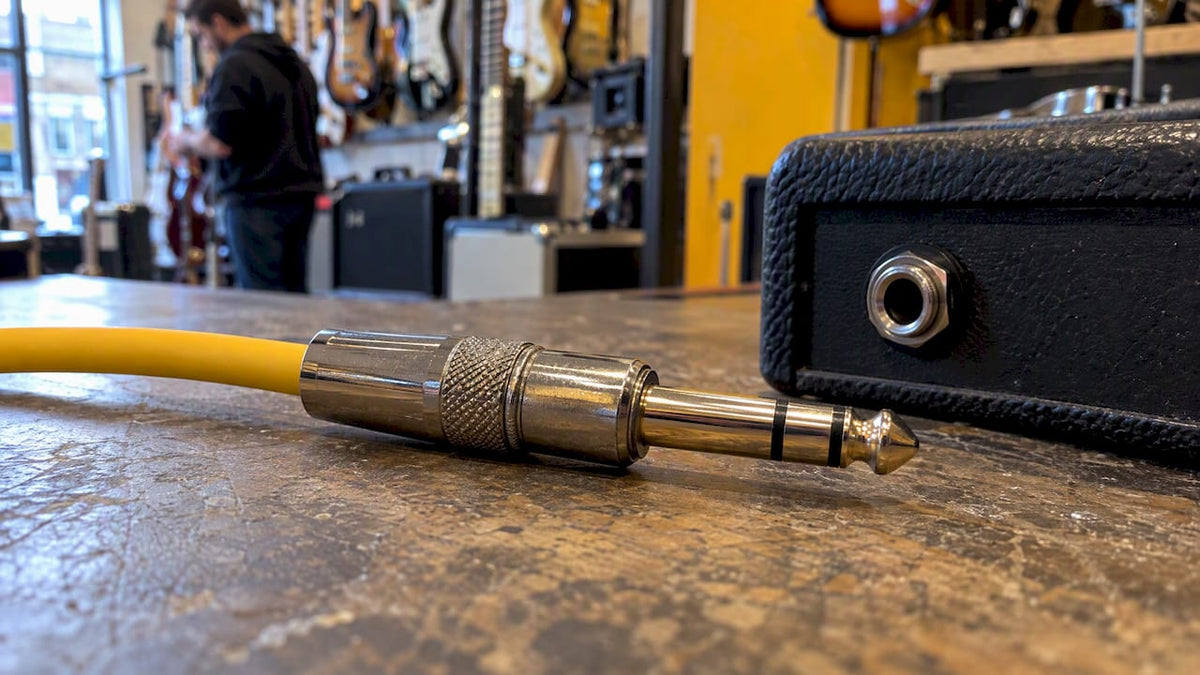
A TRS connector is an audio jack with three contacts: Tip, Ring and Sleeve. The extra ring is what lets one plug carry either a stereo pair or a balanced mono signal. It comes in more than one size, so “TRS” tells you how the plug is wired, not how big it is. This guide explains what each part does, how TRS differs from TS and TRRS, what happens if you mix them up, and how to check a cable before you plug it in. We cover it from a guitarist’s point of view, because that is where most of the mix-ups happen.
Table of Contents
- What TRS stands for and how the plug is built
- TRS, TS and TRRS side by side
- Is TRS the same as 3.5 mm?
- Two jobs for the same plug: stereo and balanced mono
- Do you use TRS with a guitar?
- What happens if you plug a TRS cable into a TS jack?
- Is a TRS cable the same as an AUX cable?
- Where TRS matters on stage and in the studio
- Our view: buy the right cable once
- Shop leads, accessories and setups with us
- FAQ
- Sources
What TRS stands for and how the plug is built
TRS stands for Tip, Ring, Sleeve. Look at a TRS plug and you will see three metal sections, split by two thin insulating bands, usually black or white. Focusrite’s support article on TS, TRS and TRRS connectors describes the same layout: three conductors separated by two insulating bands.
Each section is a separate electrical path:
- Tip: the very end of the plug. It carries a signal: left channel on stereo gear, the “hot” signal on balanced gear.
- Ring: the band just behind the tip. It carries a second signal: right channel on stereo gear, the inverted (“cold”) signal on balanced gear.
- Sleeve: the long section nearest the cable. It is the ground or shield, and it is common to both signals.
The insulating bands matter. They stop the three contacts touching each other. If a plug has only one band, it has only two contacts, which makes it a TS plug. If it has three bands, it has four contacts and is a TRRS plug.
In the UK you will often hear these called jack plugs (the male end on the cable) and jack sockets (the female end on the equipment). The word “jack” alone gets used for both, which is why saying “TRS” or “TS” is clearer than asking for “a jack lead” and hoping.
TRS, TS and TRRS side by side
The three names differ only in the number of contacts. That one difference decides what the plug can carry.
| Type | Contacts | Rings | Typical signal | Where you find it |
|---|---|---|---|---|
| TS (Tip, Sleeve) | 2 | 0 | Unbalanced mono | Guitar and bass leads, pedal patch cables, many amp inputs |
| TRS (Tip, Ring, Sleeve) | 3 | 1 | Stereo, or balanced mono | Headphones, line inputs and outputs on interfaces and mixers, insert points |
| TRRS (Tip, Ring, Ring, Sleeve) | 4 | 2 | Stereo plus microphone | Phone and tablet headsets, some laptops |
Focusrite’s guide gives the same breakdown: TS for unbalanced mono, TRS with three conductors, TRRS with four and often used for headset audio with a microphone. If you want the four-pole version in more detail, we have a separate piece on TRRS and the 4-pole jack in guitar gear.
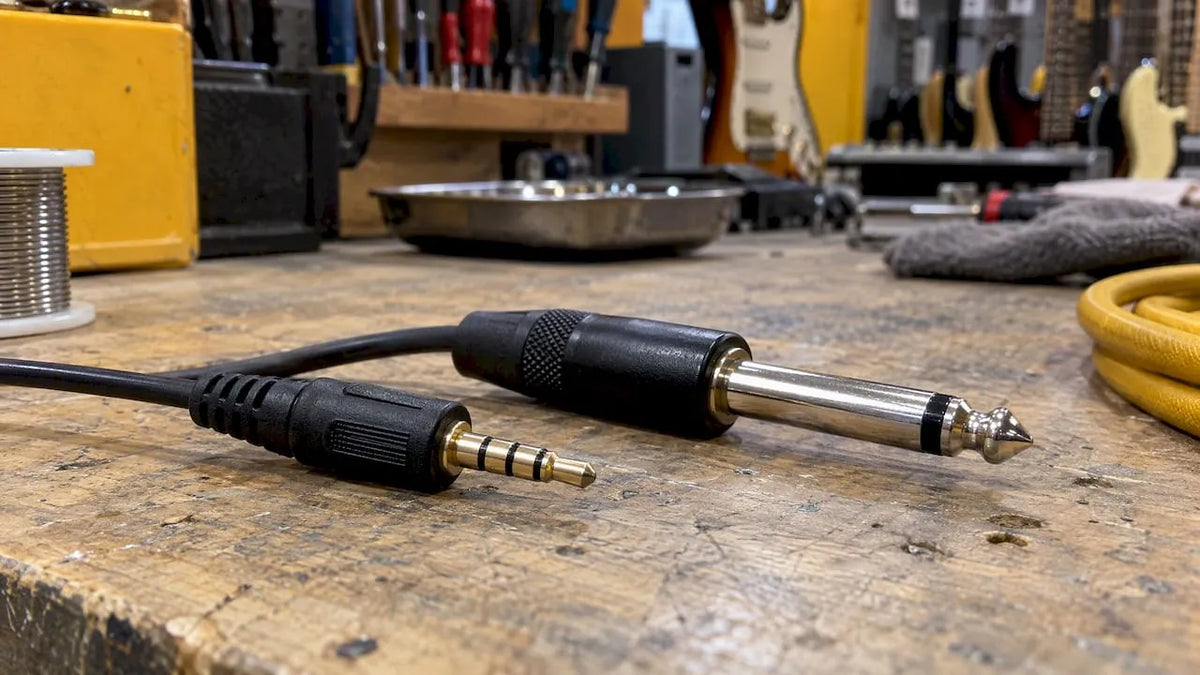
A simple way to remember it: count the black bands. One band, TS. Two bands, TRS. Three bands, TRRS.

Is TRS the same as 3.5 mm?
No, and this is the most common confusion in the search results. TRS describes the electrical layout: tip, ring and sleeve. 3.5 mm describes the physical diameter of the plug. Focusrite makes the same point: TRS is a contact configuration that exists in several sizes, including 6.35 mm and 3.5 mm.
The sizes you will meet are:
- 6.35 mm (1/4 inch): the full-size jack on guitar leads, amp inputs, studio headphones and mixers. Historically it was developed for telephone switchboards.
- 3.5 mm (often called mini jack): the small plug on phones, laptops and earbuds, and on many compact synths and pedals.
- 2.5 mm: rarer, found on some small devices.
A 3.5 mm plug really is 3.5 mm across. Calling it “1/8 inch” is a handy shorthand, but 1/8 inch works out at 3.175 mm, so it is not an exact conversion.
So a 3.5 mm plug can be TS, TRS or TRRS, and so can a 6.35 mm plug. When you buy, you need two answers: how many contacts, and what size. An adapter from 3.5 mm to 6.35 mm changes the size only. It does not change the wiring, so a TRS-to-TRS adapter keeps a stereo or balanced signal intact, while a TS adapter will not.
Two jobs for the same plug: stereo and balanced mono
A TRS connector can be wired for two quite different purposes. The plug looks identical. What changes is what the equipment at each end expects.
Stereo, unbalanced
Headphones are the everyday example. The tip carries left, the ring carries right, and the sleeve is the shared return. Headphone outputs on amps, interfaces and mixers use this arrangement. If you plug in stereo headphones, you get both channels because there are two signal paths plus a ground.
Balanced mono
Here the tip and ring carry the same signal, one of them flipped in polarity, with the sleeve as the shield. The receiving input subtracts the two, so any interference picked up along the cable, which appears on both conductors, cancels out. That is why balanced connections are used for longer runs between a stage box, mixer and recording interface, where hum and buzz would otherwise creep in. Focusrite notes that many of its line inputs and outputs are balanced TRS, while headphone outputs are stereo TRS.
The practical rule: a TRS plug does not tell you which of the two jobs it is doing. The socket it goes into decides.
Insert points
On some mixers, a single TRS socket works as an insert: the tip sends the signal out to an outboard unit such as a compressor and the ring brings it back. These need a special split lead, not an ordinary stereo or balanced cable.
Do you use TRS with a guitar?
For the guitar itself, usually not. Electric, bass and acoustic-electric guitars put out an unbalanced mono signal, and they are designed for TS leads. Focusrite advises avoiding TRS for most guitars. A standard instrument cable is a shielded TS lead, and that is what your guitar, pedalboard and amp expect.
TRS turns up around the guitar rig in a few places:
- Headphone outputs on modelling amps, practice amps and interfaces.
- Line inputs and outputs on audio interfaces, DI boxes and mixers, if you record your amp or modeller.
- Expression and footswitch inputs on pedals. Many expression pedal ports use a TRS cable, and some dual footswitches use TRS too, to carry two switch signals down one lead. Check your pedal’s manual rather than guessing.
- Pedal and synth connections on compact gear that uses 3.5 mm sockets.
- Active pickup and preamp systems. Some acoustic pickup systems use a stereo jack on the guitar to power the electronics from a lead. Look at the manual before buying a cable. Our strap jack and cable for the L.R. Baggs M1 and Anthem is an example of a part where the connector detail matters.
One warning that catches people out: guitar leads and speaker leads can have identical-looking 1/4 inch plugs, but they are built differently. A speaker cable is heavier because it carries high current from the amp to the speaker. A guitar cable is a thin shielded lead for a very small signal. Do not swap them. If you need a speaker lead, buy one sold as a speaker lead, such as the Citronic jack-to-jack speaker cable, 1.5 m.
What happens if you plug a TRS cable into a TS jack?
It is one of the most-asked questions on this topic, and the answer depends on which way round the mismatch is.
A TS plug into a stereo TRS socket. The plug’s single insulated section shorts the ring contact to the sleeve. You lose one channel, and Focusrite says as much. On a headphone socket that means sound in one ear only. On a balanced input it can mean a weak, noisy or lower-level signal, because the cold leg is grounded.
A TRS plug into a TS socket. It will usually fit physically, because the sizes match. The socket only has a tip and sleeve contact, so it will make contact with the tip and with the sleeve. The ring simply sits in the sleeve contact. In many cases you get a working mono signal, but it is not guaranteed, and on gear with unusual wiring it can short a signal. If an input is unbalanced, use the lead the manufacturer intended.
Neither mismatch normally damages equipment at low signal levels, but there are exceptions, particularly with phantom power, speaker outputs and active circuits. If you hear one-sided audio, a hum, or a very quiet signal, stop and check the cable type before turning anything up.

Is a TRS cable the same as an AUX cable?
Often, yes, but not always. A standard 3.5 mm AUX cable between a phone and a speaker is usually a TRS lead: left, right and ground. The word “AUX” describes the job (an auxiliary input), not the plug.
The catch is TRRS. Modern phones and laptops often have a single 3.5 mm socket that expects four contacts for headset and microphone. Puget Systems’ guide explains that stereo TRS headphones generally work in phone and tablet TRRS sockets, while PCs typically separate the headphone socket (TRS) from the microphone socket. So a headset with a single TRRS plug will not give you a working mic in a desktop PC’s headphone port without a splitter.
How to check before you plug in
- Count the bands on the plug: one, two or three.
- Read the port labels on the equipment. Symbols for headphones, line in, line out, mic or insert tell you what the socket expects.
- Check the manual when the labels are unclear. Look for the words balanced, unbalanced, stereo, insert or footswitch.
- Know both ends. A TRS lead in a balanced socket behaves as balanced, but the plug’s appearance alone cannot tell you what signal it is carrying. What counts is how the equipment at each end is configured.
- Match the size, then add an adapter only if you must, and make sure it keeps the same number of contacts.
Where TRS matters on stage and in the studio
Once you move from a bedroom rig to a band setup, TRS leads begin to appear between stage boxes, mixers and powered speakers. If you are weighing up whether to buy or hire a PA for a one-off event, audio system hire costs are worth a look. Whichever route you take, check the connector types on both sides before the day: a mix of TS, TRS and XLR is normal, and the cable that comes in the box is not always the one you need.
For tidy multi-channel setups, a remote stage box keeps long balanced runs off the stage floor. The Soundcraft Mini Stagebox 16R and Mini Stagebox 32R are examples. For headphones that connect over a standard stereo jack, the Audio-Technica ATH-M30x is a typical studio-style option.
Our view: buy the right cable once
We set up and inspect every instrument we sell, and the cable question comes up at the counter more than you might expect. A player gets a new amp or interface home, plugs in, and hears one-sided sound or hum. Nine times out of ten the guitar, amp and interface are fine. The cable is the wrong type for that socket.
Our advice, from the bench:
- Use TS for the guitar and pedals. Keep a decent shielded instrument lead and a few short patch cables. Do not use a stereo lead where a mono one is needed.
- Use TRS for headphones and balanced line connections. If you record, a balanced lead between your interface and monitors is worth having.
- Label what you own. A strip of coloured tape on each end of a TRS lead saves a lot of guessing later.
- Do not use a speaker lead as an instrument lead, or the reverse. The plugs match, the cables do not.
- When in doubt, ask. Bring the gear, or tell us the make and model, and we will tell you which lead it needs.
A cheap cable bought wrongly costs you more than a good one bought correctly. If a connector shape confuses you, that is a normal sign the industry uses too many similar-looking plugs, not a sign you are doing something wrong.
— Music
Shop leads, accessories and setups with us
If you need the right lead or a rig that works first time, we stock cables, adapters and accessories alongside new and pre-owned guitars, amps and pedals. You can browse our accessories range, try gear in our Huntingdon shop, and have a guitar set up and checked before it goes home with you.

For a few ideas on what else is worth carrying in your gig bag, see our guide to must-have guitar accessories. If you are building a rig around an amp, our guitar amps and combos are a good place to start.
FAQ
What is a TRS connector?
A TRS connector is an audio jack with three contacts: Tip, Ring and Sleeve, separated by two insulating bands. It can carry a stereo signal, as with headphones, or a balanced mono signal, as with many line inputs and outputs on interfaces and mixers. It comes in sizes including 6.35 mm and 3.5 mm.
Is TRS the same as 3.5 mm?
No. TRS is the wiring layout, while 3.5 mm is the plug diameter. A 3.5 mm plug can be TS, TRS or TRRS, and a 6.35 mm plug can be TRS too. To buy the right cable, you need to know both the number of contacts and the size.
What happens if you plug a TRS cable into a TS jack?
It usually fits, and often passes a mono signal, but the result depends on how the equipment is wired. The reverse, a TS plug in a stereo TRS socket, loses one channel. If audio sounds one-sided, thin or noisy, check that the cable matches the socket.
Is a TRS cable the same as an AUX cable?
A standard 3.5 mm AUX lead is usually TRS, carrying left, right and ground. AUX describes the job, not the plug. Phones and laptops with a single combined headset socket may expect TRRS, so check the number of bands.
Can I use a TRS cable for my guitar?
It is best to use a TS instrument cable. Most guitars have an unbalanced mono output designed for TS, and Focusrite advises avoiding TRS for most guitars. Keep TRS for headphones and balanced line connections.
Sources
- What are TS, TRS, and TRRS connectors? (Focusrite)
- TS and TRS, oh and TRRS (Puget Systems)
- Audio system hire costs




Share:
Unity Gain Amplifier: How a Voltage Follower Works