


TL;DR:
- A flanger creates a dramatic, jet-plane sound through short delay modulation and comb filtering.
- It differs from phasers and chorus by producing more metallic and pronounced sweeping effects.
- Proper use involves subtle settings and strategic placement, avoiding overuse for impactful, dynamic tones.
The flanger is one of the most misunderstood tools in a guitarist’s arsenal. Many players dismiss it as just another swirling modulation effect, something to switch on briefly and forget. But that undersells it dramatically. The flanger is responsible for some of the most iconic moments in recorded music, from the jet-plane roar on Van Halen’s “Unchained” to the hypnotic shimmer threading through Pink Floyd’s studio work. Understanding how it actually functions, and how to use it with intention, separates guitarists who dabble from those who genuinely shape their sound. This guide covers everything you need to know.
Table of Contents
- What is a flanger and how does it work?
- How does a flanger compare to phaser and chorus effects?
- Deep dive: Essential flanger controls explained
- Practical applications: Iconic flanger sounds and how to use them
- Our perspective: Why restraint and creativity set flangers apart
- Discover the right flanger for your sound
- Frequently asked questions
Key Takeaways
| Point | Details |
|---|---|
| Flanger’s unique sound | A flanger creates a jet-like swoosh by mixing a modulated delay with the original signal. |
| Key controls matter | Understanding Rate, Depth, and Feedback helps you create distinct flanger tones. |
| Use with restraint | Subtle settings enhance your mix without muddying your overall sound. |
| Guitar and beyond | Flanger effects are great on guitars but also work creatively on synths and vocals. |
What is a flanger and how does it work?
At its core, a flanger is a modulation effect that creates a sweeping, metallic sound often described as a jet plane taking off. It sounds dramatic because it is. But the mechanism behind it is surprisingly elegant.
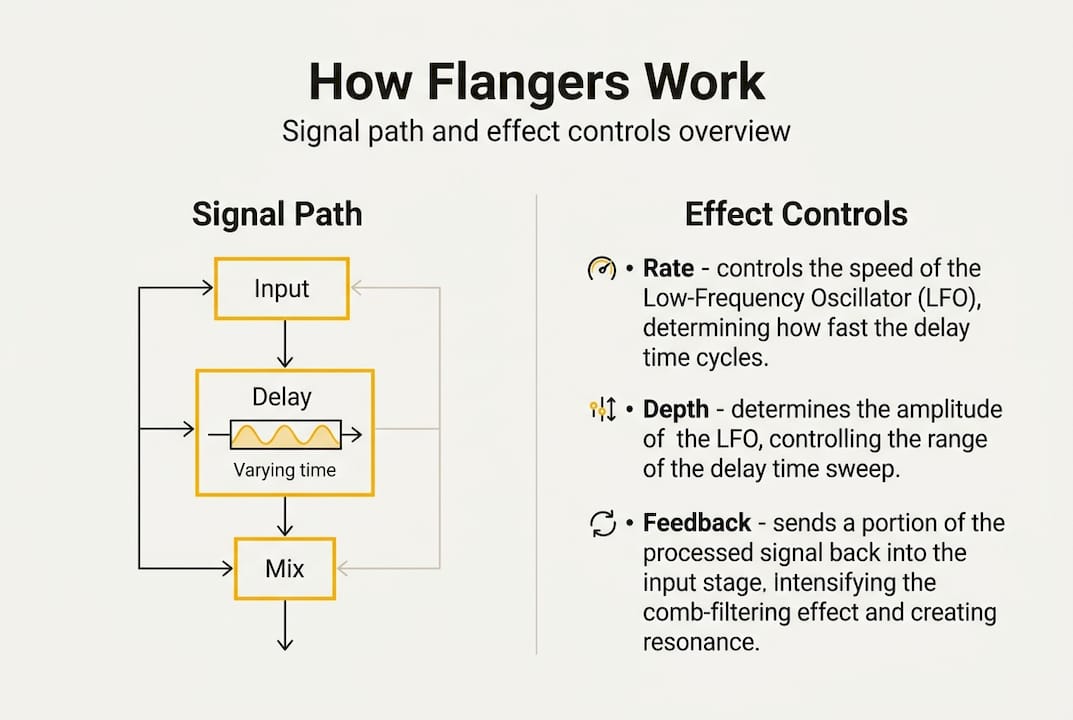
A flanger duplicates your input signal, applies a short variable delay of typically 0.1 to 20ms to one copy modulated by a low-frequency oscillator (LFO), and mixes it back with the original. When two near-identical signals are combined with a tiny timing offset, certain frequencies cancel out and others reinforce each other. This creates what engineers call a comb filter, named after the way its frequency response looks on a graph, like the teeth of a comb. As the LFO continuously shifts the delay time, those notches sweep up and down the frequency spectrum, producing the characteristic whooshing sweep.
The history of flanging is rooted in analogue tape recording. Engineers in the 1960s discovered the effect accidentally by pressing a finger against the flange (the rim) of a tape reel, slowing it fractionally against a second machine playing the same track. The result was that unmistakable, otherworldly sweep. Jimi Hendrix, The Beatles, and later The Police all used it to stunning effect.
Here is a quick overview of the key building blocks:
| Component | Function | Sonic result |
|---|---|---|
| Signal duplication | Creates two identical copies | Thicker baseline sound |
| Short delay (0.1–20ms) | Offsets one copy slightly in time | Comb filter formation |
| LFO modulation | Continuously varies the delay | Sweeping, animated effect |
| Wet/dry mix | Blends effect with original signal | Controls intensity |
“The flanger’s comb filter effect is what gives it that metallic, jet-like quality that no other modulation effect can truly replicate.”
If you are new to effects in general, it helps to first explore guitar effects types explained to understand where the flanger sits in the broader landscape of tone-shaping tools.
How does a flanger compare to phaser and chorus effects?
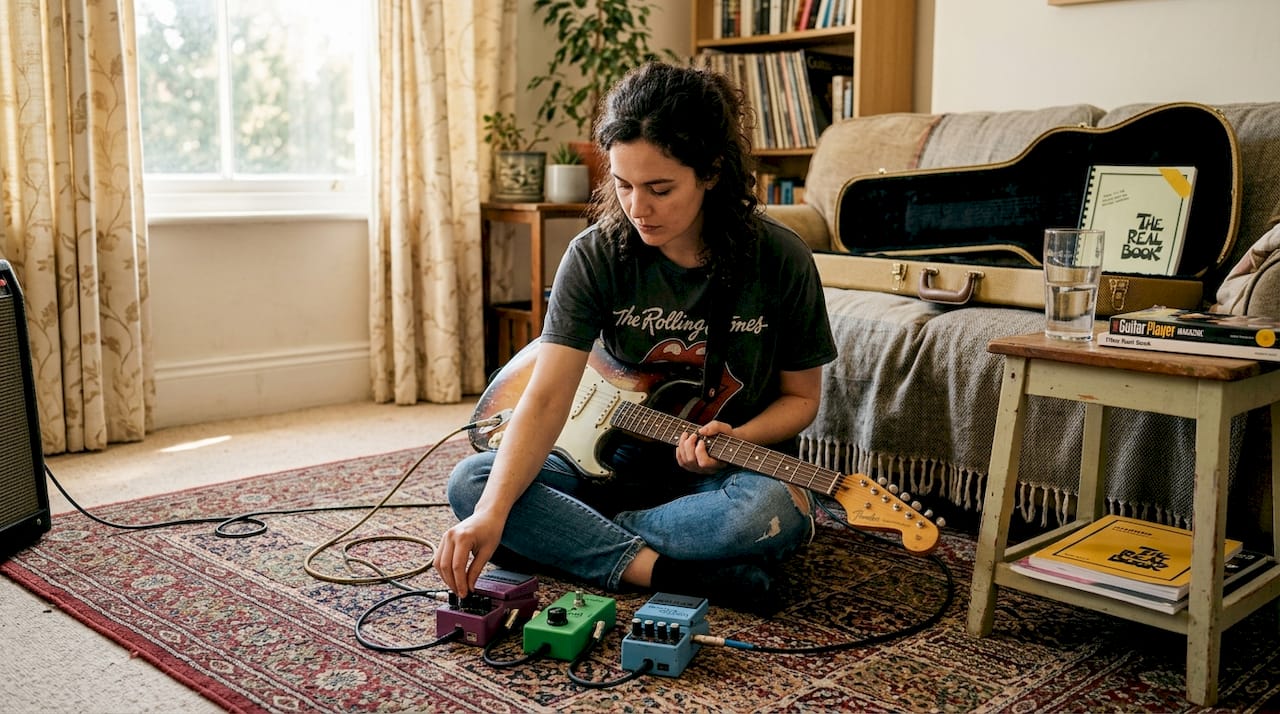
Knowing how a flanger works sets the stage for understanding how it differs from similar effects. The phaser, chorus, and flanger are all modulation effects, and they share a common goal: thickening and animating your signal. But the way each achieves that goal is quite different, and choosing the wrong one for a situation can leave your tone feeling off.
A flanger is more dramatic and metallic than a phaser, which uses all-pass filters rather than actual delay to create non-harmonic notches and a smoother sweep. A chorus uses longer delays of 20ms or more combined with subtle pitch variation to create the impression of multiple instruments playing simultaneously, which is subtler and warmer.
Here is how the three compare side by side:
| Effect | Delay time | Sonic character | Classic example |
|---|---|---|---|
| Flanger | 0.1–20ms | Metallic, jet-like sweep | Van Halen, “Unchained” |
| Phaser | No true delay | Smooth, organic whoosh | Stevie Wonder, “Higher Ground” |
| Chorus | 20ms+ | Lush, shimmering thickness | Nirvana, “Come as You Are” |
When should you reach for each one? Consider these practical pointers:
- Flanger: Hard rock, psychedelic leads, dramatic transitions, or any moment needing a bold, sweeping statement
- Phaser: Funk rhythms, classic rock solos, smooth jazz textures, and anywhere you want movement without aggression
- Chorus: Clean arpeggios, ballads, ambient passages, and bass guitar to add width without drama
Pro Tip: If you are trying to identify a flanger by ear, listen for that distinctive jet-plane acceleration. A phaser sounds more like a gentle wave. A chorus sounds like a choir. Once you hear the difference, you cannot unhear it.
For a deeper look at matching effects to your playing style, our guide on how to choose the best for your tone is well worth reading.
Deep dive: Essential flanger controls explained
Distinguishing between effects is vital, but understanding each control is what unlocks creative potential. Most flanger pedals share a common set of parameters, and knowing what each one does means you can dial in exactly the sound you want rather than turning knobs randomly and hoping for the best.
Key parameters include Rate, Depth, Feedback, Delay time, and Mix, covering everything from LFO frequency at 0.02 to 16Hz through to the wet/dry blend. Here is what each one actually does:
- Rate (Speed): Controls how fast the LFO sweeps the delay time. A slow rate gives a gradual, hypnotic sweep. A fast rate produces a more frantic, almost vibrato-like effect.
- Depth (Width): Determines how wide the LFO modulates the delay. More depth means more dramatic sweeping. Less depth keeps the effect subtle and musical.
- Feedback (Regeneration): Feeds the delayed signal back into itself. Higher feedback intensifies the comb filter notches, making the effect more pronounced and metallic. Too much feedback can sound harsh.
- Manual (Delay Time): Sets the base delay time before modulation kicks in. Shorter times produce a sharper, more metallic sound. Longer times edge toward chorus territory.
- Mix (Wet/Dry): Blends the effected signal with your original dry signal. This is arguably the most important control for keeping your tone musical.
Pro Tip: Start with Depth at around 50%, Feedback below 40%, and Mix at roughly 50%. From there, adjust Rate to taste. This gives you a usable foundation without immediately drowning your tone in swirling chaos.
When shopping for the right unit, reading up on the best guitar pedals available in 2025 and 2026 will help you narrow down which flanger suits your rig and budget.
Practical applications: Iconic flanger sounds and how to use them
At this point, you know what the controls do, so how are they used by the pros? The answer is with far more restraint than most beginners expect.
Here is a practical walk-through for setting up a flanger on your pedalboard:
- Place the flanger in the right position: Typically after drive pedals but before reverb and delay in your signal chain. This keeps the modulation clean and prevents it from muddying your ambient effects.
- Set Rate to slow: Begin with a gentle sweep, around 0.5Hz. This is where most classic rock flanging lives.
- Dial in Depth moderately: Around 50 to 60% gives movement without overwhelming your fundamental tone.
- Keep Feedback conservative: Under 40% unless you are deliberately chasing an extreme, sci-fi sound.
- Blend with Mix: Set Mix to around 50% to preserve your dry signal. Subtle blending is almost always more effective than a fully wet sound.
- Adjust to taste: Once your baseline is set, small tweaks to Rate and Depth will take you from classic rock sweep to full psychedelic territory.
The iconic use of flangers spans psychedelic guitar leads, Van Halen’s “Unchained,” Pink Floyd’s studio recordings, and even synth and vocal production. Flangers are not exclusively a guitar tool either. Producers use them on synth pads, drum overheads, and vocal harmonies to add movement and drama.
“The flanger is most powerful when it feels like it belongs in the track rather than sitting on top of it.”
For more inspiration on how effects work in real playing contexts, browse our examples of guitar pedals for electric guitarists, and check out our tips for using guitar pedals to get the most from your signal chain.
Our perspective: Why restraint and creativity set flangers apart
With the essentials covered, here is our honest take after years of stage and studio experience: the flanger is one of the most abused effects in a guitarist’s collection. It is also one of the most rewarding when used with genuine intention.
The most common rookie mistake is maxing out the Depth and Feedback controls and leaving the effect on throughout an entire song. The result is exhausting for listeners and buries the actual guitar performance beneath layers of metallic swooshing. The flanger works best as a punctuation mark, not a paragraph.
Think about how Eddie Van Halen or Andy Summers of The Police used it. Sparingly. Purposefully. The effect arrived at a specific moment in a song and made that moment feel larger than life. That is the real power of the flanger: contrast. When it appears in a mix where everything else is dry, it commands attention.
We also believe context matters enormously. A flanger that sounds brilliant in a solo rehearsal can completely dissolve in a full band mix, especially if there are already chorus or reverb effects competing for sonic space. Getting your effects chain guide right is just as important as the pedal itself.
Experiment freely, but listen critically. The flanger rewards patience.
Discover the right flanger for your sound
Ready to add that iconic sweep to your board? Finding the right flanger pedal makes all the difference between a tone that feels inspired and one that just feels busy. At MusicStreet, we stock a carefully chosen range of effects pedals to suit every style and budget, from vintage-voiced analogue units to feature-rich digital options.

Whether you are after a classic swoosh for your rock leads or a more nuanced shimmer for studio work, our team in Huntingdon is happy to walk you through the options in person. You can also shop premium guitar effects online and explore our full range at your own pace. For something truly special, the Strymon Flint pedal is a standout choice that pairs beautifully with modulation in any rig.
Frequently asked questions
What controls should I adjust first when trying a flanger?
Start with Rate and Depth to explore modulation speed and intensity, then use the Mix control to blend the effect tastefully with your dry signal before touching anything else.
Why does my flanger sound muddy in a band mix?
Excessive Depth or Feedback are usually the culprits. As the subtle blends enhance mixes principle shows, pulling back these controls and reducing your Mix level will almost always clean things up immediately.
Are flangers only for guitars?
Not at all. Flangers work well on synths, vocals, and drum overheads too, making them a versatile studio tool well beyond the guitar world.
What is the difference between a digital and analogue flanger?
Analogue flangers use bucket-brigade circuits that many players describe as warmer and more organic sounding, while digital units typically offer greater control, more preset options, and more consistent performance at the cost of some of that vintage character.

Share:
The Ultimate Electric Guitar Buying Guide for All Levels
What is an effects loop? Optimise your guitar tone