

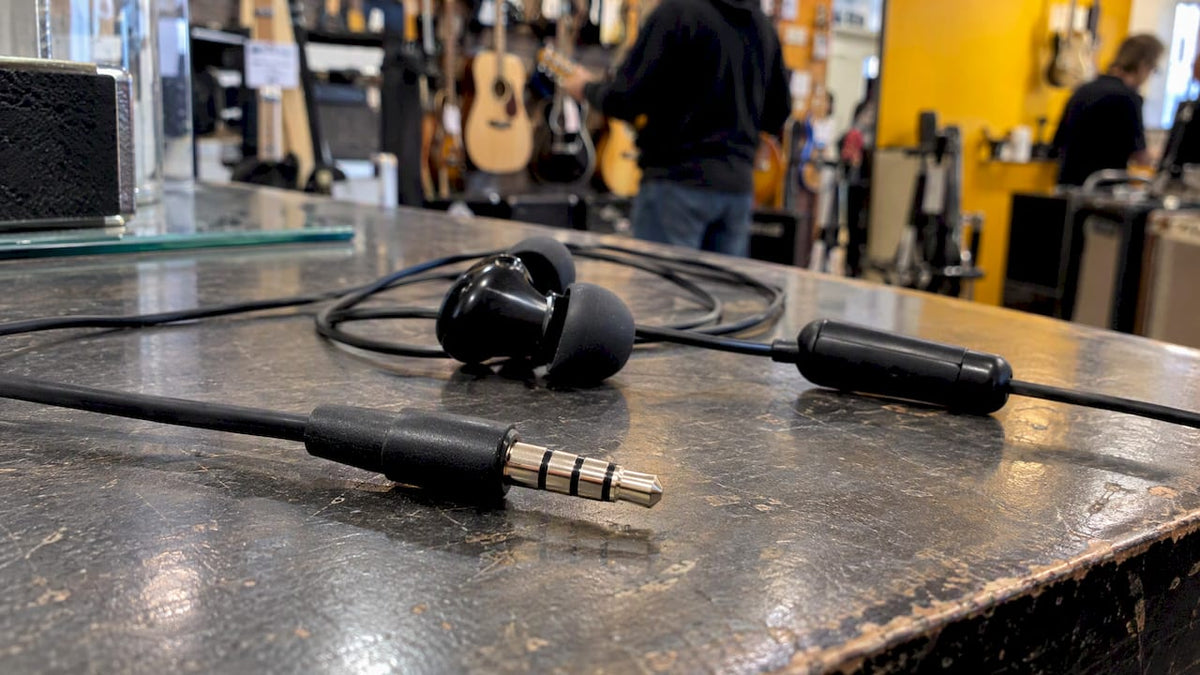
A TRRS connector is a four-contact audio plug, almost always 3.5 mm, that carries left audio, right audio and a microphone signal down one cable. TRRS stands for Tip, Ring, Ring, Sleeve. You will find it on headsets for phones, tablets and some laptops, and on gaming headsets. It is not the plug your guitar lead uses: guitars use a two-contact 6.35 mm TS jack. Below you will see how to spot a TRRS plug, what each contact does, why two TRRS headsets can behave differently, and when a TRRS plug will or will not work in a given socket.
Table of Contents
- What TRRS stands for and how to recognise one
- What each contact carries
- TRRS versus TRS: the real differences
- Where you will find TRRS connectors
- Is a TRRS plug compatible with a TRS socket?
- Does TRRS belong in a guitar rig?
- Microphone jack and headphone jack: what is the difference?
- Choosing the right cable or adapter
- Troubleshooting a TRRS headset
- Our view: match the connector to the job
- Get the right gear from Musicstreet
- FAQ
- Sources
What TRRS stands for and how to recognise one
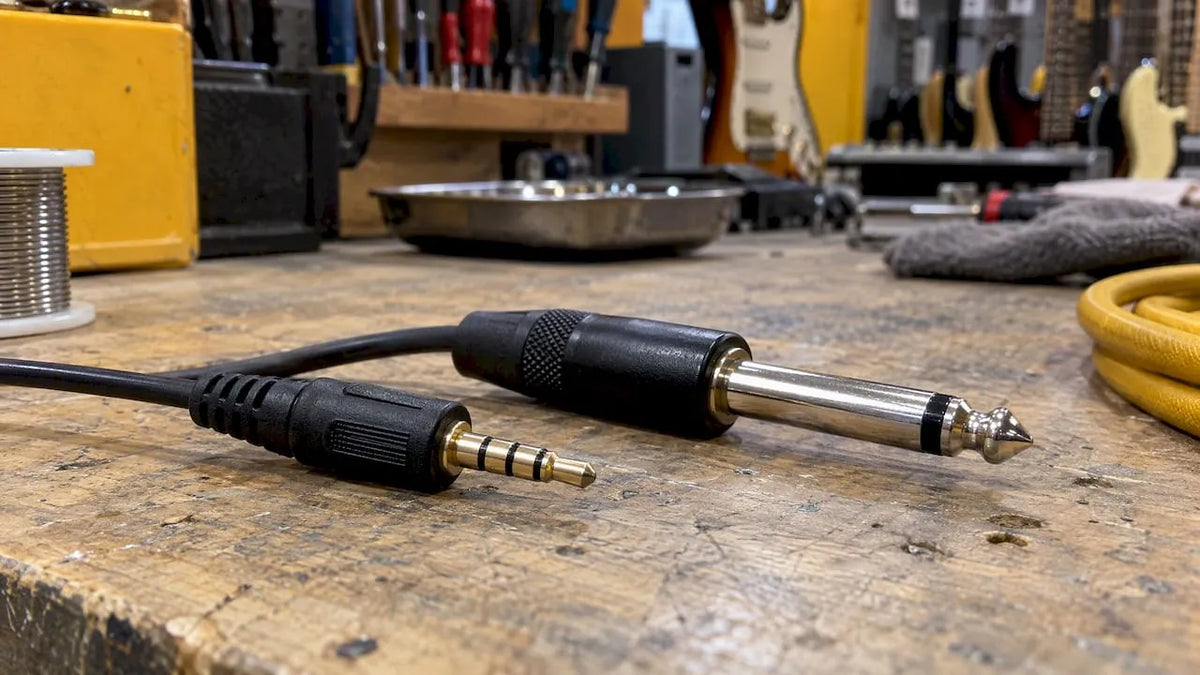
The name lists the four conductive sections of the plug, starting at the end: tip, ring, ring, sleeve. Focusrite’s UK help centre explains that these sections are separated by insulating bands. A TRRS plug therefore has three bands and four contacts. A TRS plug, the ordinary stereo headphone jack, has two bands and three contacts. A TS plug has one band and two contacts.
The quickest check is to look at the metal. Hold the plug up to the light and count the dark rings:
- One dark ring: TS, mono.
- Two dark rings: TRS, stereo or balanced mono.
- Three dark rings: TRRS, stereo plus microphone in most consumer kit.
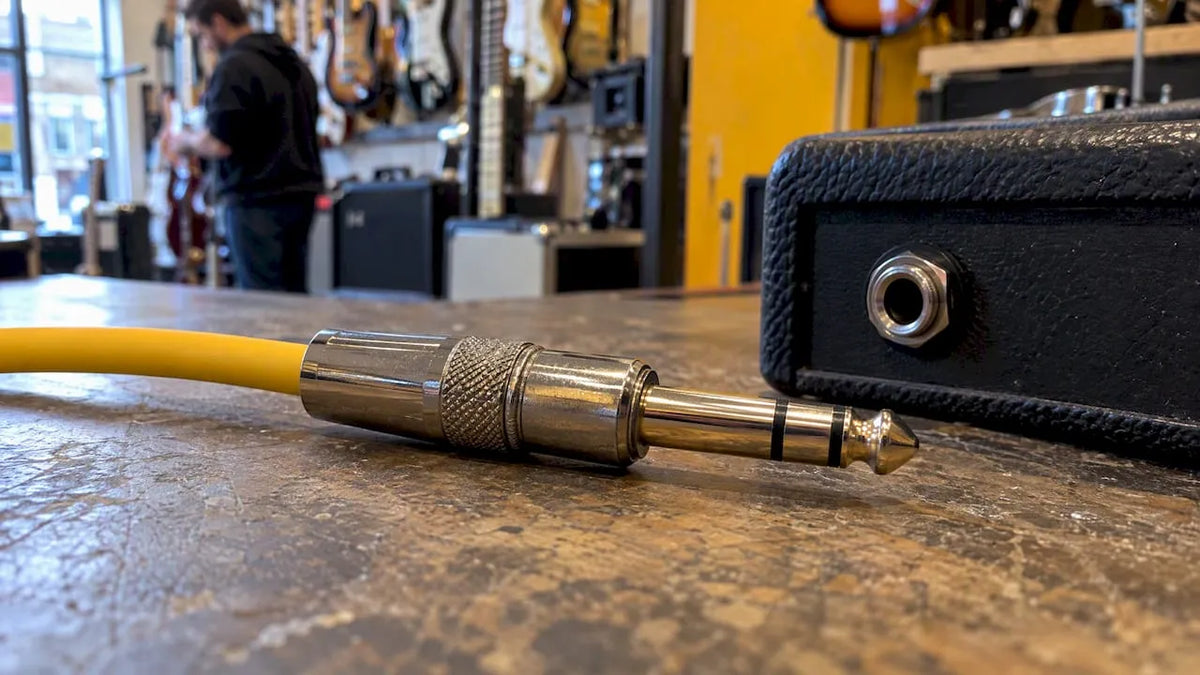
In the UK these are usually called jack plugs (the male end) and jack sockets (the female end), and you will see “3.5 mm jack” or “3.5 mm TRRS jack” on product listings. The 3.5 mm size is the one you find on portable audio gear and headphones. The larger 6.35 mm (quarter-inch) size is the one you meet on guitars, amplifiers, mixers and studio equipment.
What each contact carries
In a headset, the four contacts split the job between listening and speaking. The tip and first ring carry the left and right audio going to your ears. The remaining two contacts carry the ground return and the signal coming back from the microphone. Which of those two is which depends on the wiring standard, and that is where most TRRS confusion starts.
CTIA wiring
CTIA is the arrangement used by most modern phones, tablets and headsets. According to Pro Video Coalition’s guide to these connectors, the tip carries left audio, the first ring carries right audio, the second ring is ground and the sleeve is the microphone.
| Contact | CTIA function |
|---|---|
| Tip | Left audio |
| Ring 1 | Right audio |
| Ring 2 | Ground |
| Sleeve | Microphone |
Apple devices use the CTIA physical arrangement, but Electronics Notes points out that Apple runs its own signalling for the microphone and volume controls. That is one reason a headset’s inline buttons can work on one phone and do nothing on another, even though the plug fits.
OMTP wiring
OMTP is the older arrangement. The same Pro Video Coalition guide says it swaps the last two connections: the second ring carries the microphone and the sleeve is ground. Left and right audio stay in the same place, so a mismatched headset still plays sound. What goes wrong is the microphone: it may be silent, very quiet or distorted, because the device is listening on the wrong contact.

If a headset gives you music but no voice, an OMTP/CTIA mismatch is the first thing to suspect, especially with older headsets or imported ones.
TRRS versus TRS: the real differences
A TRS connector has three conductors: tip, ring and sleeve. Focusrite notes it can carry either a balanced mono signal or an unbalanced stereo signal. A TRRS connector adds a fourth conductor, so compatible devices can send audio and receive a microphone signal through one headset connection.
| TS | TRS | TRRS | |
|---|---|---|---|
| Contacts | 2 | 3 | 4 |
| Insulating bands | 1 | 2 | 3 |
| Typical use | Guitar leads, mono instrument signals | Stereo headphones, balanced mono lines | Headsets with microphone |
| Common sizes | 6.35 mm, 3.5 mm | 6.35 mm, 3.5 mm | Almost always 3.5 mm |
The TRS connector is worth understanding before you move on, because it is the one musicians meet most often. Our own guide to the TRS connector and how to use it covers balanced lines, insert cables and stereo headphone leads in detail.
One wrinkle: you may occasionally see TRRS used in specialist audio contexts for a balanced stereo connection, where each channel has its own return path. That is a different wiring from the headset-with-microphone arrangement above. The plug looks the same, so the wiring has to come from the manufacturer’s documentation, not from the shape.
Where you will find TRRS connectors
TRRS earns its place anywhere a single small socket has to handle sound in both directions.
- Phones and tablets. Focusrite says mobile phones and tablets typically use TRRS for both input and output. Headphone jacks on phones have become less common in recent years, with USB-C and Bluetooth taking over, according to Wikipedia’s phone connector article.
- Headsets for calls and gaming. The extra contact lets a built-in microphone share the cable. If you are shopping for a wired gaming set, a 3.5mm gaming headset with mic is the typical case: one 3.5 mm plug carrying stereo sound and voice to a console or phone.
- Some laptops. Many laptops have a single combined headset socket that takes a TRRS plug.
- Cameras and video gear. Some portable consumer devices use TRRS for stereo audio plus analogue video, per the Wikipedia TRRS connector entry.
- Breakout boards and hobby electronics. Adafruit’s TRRS jack breakout board is a common route for people building their own gear, and it includes switched outputs that can change from a built-in speaker to headphones when a plug goes in.
Is a TRRS plug compatible with a TRS socket?
The honest answer is: sometimes, and it depends on the direction.
TRS headphones in a TRRS socket
This usually works. Pro Video Coalition notes that a stereo TRS headphone without a microphone can generally be connected to a smartphone or tablet with a TRRS socket. You get stereo sound. You do not get a microphone, because the headphones do not have one. Some devices detect the plug and switch off the internal speaker while keeping the device’s own microphone active.
TRRS headset in a TRS socket
This is the risky one. A TRRS headset in a plain TRS headphone output is not designed to work. Focusrite states that TRRS headsets cannot be connected directly to its interface headphone outputs, even with a 3.5 mm to 6.35 mm adapter. Pro Video Coalition gives a similar warning about plugging a TRRS headset into the TRS headphone socket of a microphone. The fourth contact may short against something, the sound may be missing or odd, and the microphone will not work.
Desktop PCs
Many desktop computers use separate sockets: one TRS for headphones and one TRS for the microphone. Puget Systems notes that these sockets do not accept a single TRRS plug in the way a phone does. If you plug a TRRS headset into the green headphone socket you will normally hear sound only. For both, you need either a headset with two separate plugs, a splitter made for the job or a USB headset.
A quick decision path
- Count the rings on the plug you have.
- Look at the socket’s label. A headphone symbol alone usually means output only. A headset symbol, or a headphone and microphone combined, means TRRS.
- Match the standard. If sound works but the microphone does not, try an adapter or headset that matches the other wiring standard.
- For anything connected to an audio interface, mixer or microphone preamp, read the manual first. Use headphones with a TRS plug, not a headset.
Does TRRS belong in a guitar rig?
Short answer: not for the instrument lead. Electric guitars generally use 6.35 mm TS connectors, as Focusrite and Wikipedia both note. The signal is a single mono, unbalanced one, so two contacts is all it needs. A TRRS plug in a guitar jack would be the wrong shape of problem.
TRRS does show up around the edges of a modern guitar setup, though:
- Headphone amps and practice amps. A 3.5 mm output on a small amp is normally a TRS stereo headphone socket. Plug in headphones, not a headset.
- Phone and tablet recording. If you record guitar into a phone through an adapter, the phone’s socket is often TRRS. Some adapters are made to send a guitar signal into the microphone contact. Check the adapter says it is for instruments, because a standard headset splitter will not do it.
- Streaming and online lessons. A headset with a TRRS plug is handy for lessons over a laptop, while the guitar goes through a separate interface or amp.
- Wireless systems and in-ear monitors. Receivers often have 3.5 mm outputs. Check the manual for the wiring before using any third-party cable.
If you want a fuller walk through where the four-pole jack touches guitar gear, see our guide to TRRS and your guitar gear.
Microphone jack and headphone jack: what is the difference?
A dedicated headphone jack is an output: audio goes from the device to your ears. A dedicated microphone jack is an input: audio comes in from the microphone. On a TRRS headset socket, both jobs happen in one place. As Pro Video Coalition puts it, audio goes out to the headphones while the microphone audio travels on a separate conductor.
There is a second difference that matters more than the label: the level. A microphone input expects a very small signal, and many also supply a small bias voltage to power a headset microphone. Plug a line-level device into it and the sound may distort. Plug a headphone output into a microphone input and you will get something close to nothing. Use the socket for its purpose, and use a cable or adapter that is designed for the route you want.
For serious voice or instrument recording, a dedicated microphone on an XLR lead and an interface beats any headset. If you are building up a home recording or streaming corner, the Shure SM7B is a studio and broadcast staple, and the Audio-Technica ATH-M30x is a closed-back studio headphone with a standard TRS connection. Neither uses TRRS, which is exactly the point: serious recording separates the listening and speaking paths.

Choosing the right cable or adapter
Most TRRS problems come down to buying the wrong cable. Work through these questions:
- What are you connecting? Headset to phone, headphones to a laptop, or a microphone to a camera each need a different arrangement.
- What does the socket expect? Check the manual for TRRS wiring or a mention of CTIA or OMTP. RØDE and other manufacturers note that TRRS wiring is device-dependent, so matching plug type alone is not always enough.
- Do you need to split or combine? A headset splitter turns one TRRS plug into separate headphone and microphone plugs. A combiner does the reverse.
- Is the size right? 3.5 mm is common on portable devices. A 6.35 mm adapter will fit the plug to a larger socket but will not fix a wiring mismatch.
- Do you need an instrument-level signal? If so, buy an adapter made for instruments, not a headset adapter.
For general leads and adapters, our accessories range is the place to start. If a stereo 3.5 mm lead to phono connectors is what you need, the Kirlin Pro Deluxe 3.5 mm to RCA phono stereo cable does that job. For a mono jack to RCA run, there is the Citronic mono jack to RCA lead, 1.5 m. Both are ordinary signal leads, not TRRS headset cables, so use them for line-level connections.
Troubleshooting a TRRS headset
- Sound but no microphone: try the headset on another device. If it works there, the wiring standards differ. Use an adapter made for CTIA to OMTP conversion, or a headset that matches your device.
- Microphone but only one ear: the plug may not be fully seated, or the connector or cable has a fault. Wiggle the plug gently. If the sound cuts in and out, the jack or lead is wearing out.
- Crackle when you move the cable: this is often a worn plug or a damaged cable near the connector, rather than a standards issue.
- Headset works on a phone but not on a PC: the PC probably has separate microphone and headphone sockets. Use a splitter or a USB headset.
- Hum or noise through an interface: do not connect a TRRS headset to an interface headphone output. Use a standard TRS headphone set there.
If a lead on your pedalboard or amp is the one misbehaving, the fix is different, and the problem may sit in a jack socket inside the equipment. We carry out guitar setups, servicing and repairs in our Huntingdon shop, including checks on the output and input jacks of instruments and amps.
Our view: match the connector to the job
We spend most of our days around jack connectors, and the most common mistake we see is assuming that if a plug fits, it will work. A plug is a shape. What matters is what each contact is wired to, and who designed the equipment on either end.
The same habit that keeps a guitar rig reliable keeps a headset reliable. Know the signal, know the socket, and use the lead that was made for that route. A two-contact TS lead for a guitar. A TRS lead for stereo headphones. A TRRS headset only where a socket is built for it.
Every instrument we sell is inspected and set up before it leaves us, and we stand behind it with after-sale support. We treat leads and accessories the same way: we would rather help you pick the right cable once than sell you three that do not quite fit. If you are not sure, bring the gear in or ask us before you buy.
Music
Get the right gear from Musicstreet
Whether you are sorting out a lead for a practice amp, a case for new kit or a full instrument, we can help you in the shop in Huntingdon or online. Browse guitar amps and combos, cases and gig bags and our full range of electric guitars. Every instrument is inspected and set up, and we offer post-sale support.

If a guitar or amp is crackling, cutting out or has a loose jack, our repairs and setup service is the place to start.
FAQ
What does TRRS stand for?
TRRS stands for Tip, Ring, Ring, Sleeve. These are the four conductive sections of the plug, separated by three insulating bands. The extra ring, compared with a TRS plug, is what lets a headset carry a microphone signal alongside stereo sound.
Is TRRS compatible with TRS?
Often in one direction only. A stereo TRS headphone will generally work in a TRRS phone or tablet socket, without a microphone. A TRRS headset is not designed to work in a plain TRS headphone socket, and Focusrite says it cannot be used on its interface outputs even with an adapter.
Can I use a TRRS connector for a guitar?
Not for the instrument lead. Electric guitars generally use 6.35 mm TS jacks, which carry a single mono signal on two contacts. TRRS only appears nearby, for example on a phone socket used with a purpose-made instrument adapter, or on a headset for online lessons.
What is the difference between CTIA and OMTP?
Both are four-contact headset wirings with left audio on the tip and right audio on the first ring. They differ on the last two contacts: OMTP puts the microphone on the second ring and ground on the sleeve, while CTIA reverses them. CTIA is the one found on most modern devices.
Is a TRS cable the same as an XLR cable?
No. They are different connectors with different shapes, although both can carry a balanced signal. A TRS jack is a round plug with three contacts. An XLR has three pins in a locking circular housing and is the usual choice for microphones, such as the Shure SM57.
Sources
- What are TS, TRS and TRRS connectors? (Focusrite)
- TS/TRS/TRRS/TRRRS: Combating the misconnection epidemic (Pro Video Coalition)
- Jack or Phone Connector: Socket and Plug (Electronics Notes)
- TS and TRS, oh and TRRS (Puget Systems)
- Adafruit TRRS Jack Breakout Board
- Phone connector (audio) (Wikipedia)
- TRRS connector (Wikipedia)



Share:
What Is an Echo? A Guitarist's Guide to the Effect