

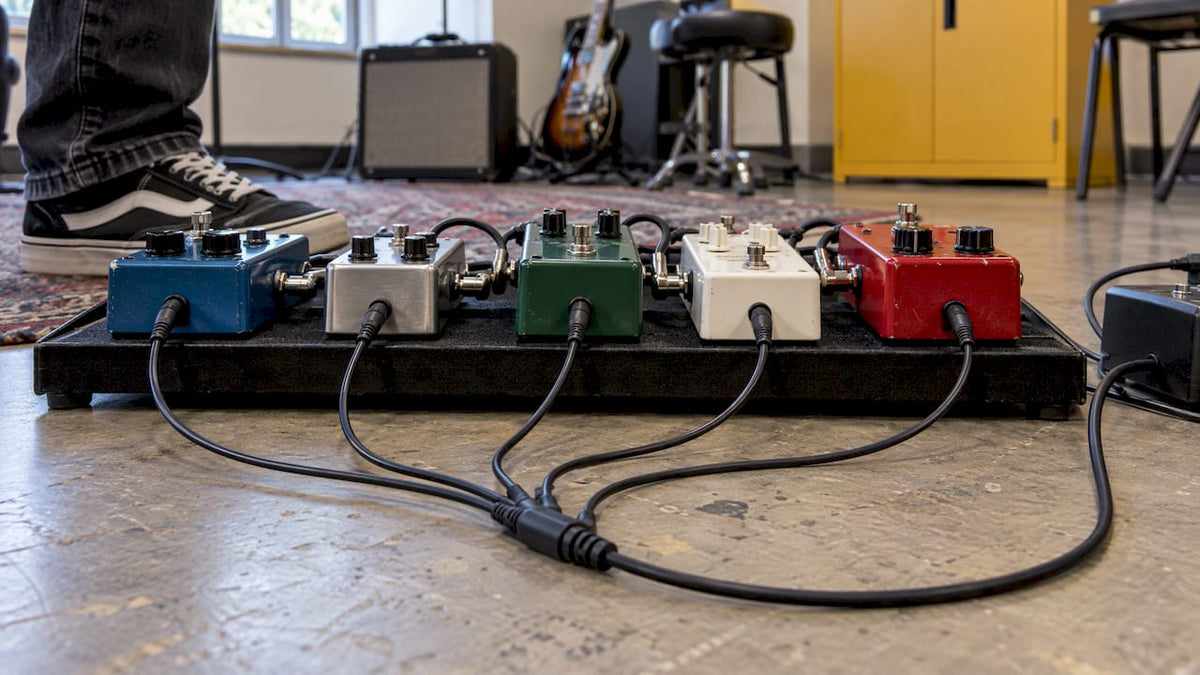
To daisy chain effects pedals, you plug one power supply into a multi-way DC cable and run each branch to a pedal. It works well when every pedal needs the same voltage and polarity, and the supply can deliver more than their combined current. Add a pedal that is hungry, digital or sensitive to noise, and you may hear hum or hiss, or the pedal may not work at all. This guide covers how to connect a chain, how to do the sums, what causes noise, and when separate isolated outputs are the better choice.
Table of Contents
- Two different chains: audio and power
- What you need before you start
- Check voltage, polarity and current first
- How to connect a daisy chain, step by step
- Which pedals suit a shared chain
- Why daisy chains can hum or buzz
- Troubleshooting a noisy or misbehaving chain
- When to use isolated outputs instead
- Daisy chain or isolated supply: a quick comparison
- Our view: power your pedals to suit your board
- Get your pedalboard powered properly
- Practical tips for a tidy, reliable board
- FAQ
- Sources
Two different chains: audio and power
People use “chain” for two separate things, and mixing them up causes most beginner mistakes.
The signal chain is the audio path. Your guitar goes into the first pedal’s input. Each pedal’s output goes to the next pedal’s input, and the last pedal feeds your amp. Pedals are wired one after another here, in series. If you want to think about order (for example where delay and reverb sit), our guide to a five-stage pedal chain walks through it.
The power daisy chain is a single DC cable with several plugs branching off it. One supply feeds all of them, so you do not need a separate wall adapter for each pedal. Nothing about it changes the order of your audio. It only decides how your pedals get their electricity.
Keep the two completely separate in your head and on your board. Patch cables carry audio between pedals. The daisy chain carries power into them. Never plug a power lead into an audio jack, or the reverse.
What you need before you start
A daisy-chain setup has three parts:
- A power supply with a DC output, usually 9V.
- A daisy-chain cable with enough branches for your pedals.
- The right barrel plug on every branch for each pedal’s power socket.
If you are starting from nothing, we stock the Klotz 3 way DC power daisy chain and the Klotz 5 way DC power daisy chain, so you can match the cable to the number of pedals on your board.
Check voltage, polarity and current first
This is the step that decides whether a daisy chain works well or causes trouble. Do it with the pedals’ manuals, or the markings beside the power socket, before you plug anything in.
Voltage
Most pedals run on 9V DC, but not all of them. Some need 12V, 18V or 24V, and some expect AC. Daisy chaining only makes sense when every pedal on the cable takes the same voltage. Putting a 9V pedal on a higher voltage can damage it. Strymon’s own support page for the Ola, for example, specifies 9V DC and warns that a higher voltage can damage the pedal.
Polarity
The standard guitar-pedal plug is centre-negative. A few pedals are centre-positive, and these must not share a chain with centre-negative ones. The diagram printed on the pedal or in its manual shows which it is.
Current
Current is measured in milliamps (mA), and it is the figure people forget. Every pedal draws some current, and your supply must be able to provide at least the total of all of them. Sound On Sound advises adding up the requirements of all your pedals and choosing a supply rated for at least that total. A supply rated higher than you need is fine. One that is too small can cause hum, failure or overheating.

The same logic applies to how pedals use a supply. A pedal only takes the current it needs, so a supply with spare capacity does not push extra into it, but too little capacity can stop a pedal working properly even when voltage and polarity are right.
Here is a worked example with deliberately round figures, so you can see how the sum goes. These are not specifications for any real pedal:
| Pedal | Voltage | Polarity | Current draw (example) |
|---|---|---|---|
| Overdrive | 9V DC | Centre-negative | 20mA |
| Fuzz | 9V DC | Centre-negative | 10mA |
| Compressor | 9V DC | Centre-negative | 30mA |
| Total | 60mA |
A supply that gives 100mA or more at 9V would cover this board with room to spare. Always use the figures from your own pedals’ manuals.
Watch for pedals with bigger demands
The familiar 9V plug does not guarantee a small current draw. Universal Audio’s UAFX pedals, for instance, use a 9V centre-negative connector but need 250mA or 400mA depending on the model, with an isolated output. Multi-effects units, digital delays, reverbs and modulation pedals often sit in this heavier bracket. Those are the pedals to give their own isolated output rather than a shared chain branch.
How to connect a daisy chain, step by step
- Switch everything off. Unplug the supply from the mains and turn your amp down or off before you touch any connections.
- Read each pedal’s requirements. Confirm 9V DC, centre-negative and the mA figure, as above.
- Add up the current. Compare the total with the supply’s output rating for that voltage.
- Plug the daisy-chain cable into the supply’s DC output. Use the main end of the cable, the one that connects to the supply.
- Connect each branch to a pedal’s power socket. One branch per pedal.
- Tidy unused branches. Leave no bare plug dangling. Cover or cap spare ends so they cannot touch metalwork or another connector.
- Connect your audio cables separately. Guitar to first pedal, pedal to pedal, last pedal to amp.
- Power up. Plug the supply into the mains, then switch on the amp. Listen with the guitar volume up and the pedals both on and off.
Do not connect pedals’ audio paths in parallel. Pedals are designed for series signal flow, and a parallel arrangement of ordinary stompboxes is not how they are meant to work.
Which pedals suit a shared chain
A shared chain is at its best with a handful of low-current analogue pedals. Sound On Sound recommends keeping daisy chains to just a few of these, with matching voltage and polarity and a supply that covers their combined draw.
Good candidates include:
- Overdrive, distortion and fuzz pedals
- Boost pedals
- Simple compressors
- Basic analogue filters
A drive pedal such as the Electro-Harmonix Soul Food is the type of simple, single-purpose pedal people commonly run from a shared cable, but always check its own manual for its current figure.
Be more careful with:
- Digital delays and reverbs
- Modulation pedals (chorus, phaser, flanger)
- Multi-effects processors
- Anything that requires 12V, 18V, 24V or AC
Pedals such as the Electro-Harmonix Holy Grail reverb or a multistage drive like the Strymon Riverside are the kind of pedals where you should read the power page of the manual first and decide whether they belong on a shared branch or on their own isolated output.
Why daisy chains can hum or buzz
The main weakness of a plain daisy chain is shared ground. Every pedal on the cable shares the supply’s ground, and your audio cables have their own ground path through the screens. Together they can form a loop. Sound On Sound explains that pedals sharing a supply ground and the signal-cable screen can create ground-loop hum, and that uneven current draw from one pedal can inject noise into the 9V line that the others hear.
Premier Guitar describes the mechanism: the audio-cable ground and the daisy-chain power ground together form a loop, and electromagnetic fields can induce a current in it, which you hear as hum.
Where it shows up most depends on the pedals. Strymon says that the risk is especially relevant with modulation and delay pedals, while a board of distortion-only pedals may never reveal the problem. That is why one player’s all-drive chain runs silently and another’s board with a chorus and delay hums.
Typical symptoms:
- A steady low hum that changes when you touch metal parts or move cables
- High-pitched whine or hiss that rises with gain
- Clicks or ticks when you switch pedals
- A pedal that resets, cuts out or sounds weak (often a current problem rather than noise)
Troubleshooting a noisy or misbehaving chain
Work through these in order. Change one thing at a time so you know which fix worked.
- Recheck the totals. Add up the mA again against the supply’s rating. An undersized supply is the most common cause of weak, cutting-out pedals and can also add hum.
- Confirm voltage and polarity. A single mismatched pedal can affect the rest of the chain.
- Shorten cables. Sound On Sound advises keeping cables short, which reduces the area of any loop and the pickup of interference.
- Unplug pedals one at a time. When the noise stops, you have found the pedal responsible. A digital or high-current pedal is the usual suspect.
- Move the culprit to its own supply. Give it a separate output, ideally an isolated one.
- Try a noise gate if gain is the issue. High-gain setups amplify every bit of residual noise. A dedicated gate such as the Boss NS-2 noise suppressor deals with noise in the signal, though it is not a cure for a power problem. Fix the power first.
If you have done all this and the board still misbehaves, bring it in. We can look at the setup in our Huntingdon shop and help you work out what needs to change.
When to use isolated outputs instead
An isolated supply gives each output its own separate supply with no direct connection between outputs, so pedals do not share a power-ground path in the way a daisy chain forces them to. That breaks the route that makes the ground loop.
Choose isolated outputs when:
- Your board includes modulation, delay or reverb pedals
- You run digital pedals or multi-effects units with higher current demand
- You have five or six pedals or more (Sound On Sound notes that separate wall supplies for each become impractical at that point, and that serious pedalboard supplies have multiple isolated outputs)
- A pedal’s maker recommends it. Strymon specifies at least 250mA for the Ola and recommends isolated high-current outputs rather than a daisy chain
- You have chased hum and cannot find another cause
Power supplies we stock that suit this job include the Strymon Ojai, the Strymon Zuma and the used MXR Mini Iso-Brick. Stock changes, especially on pre-owned items, so check the product pages for what is available now.
A sensible hybrid
You do not have to choose one approach for the whole board. A common and practical layout is to give your demanding digital and modulation pedals their own isolated outputs, then put two or three simple analogue drives on a single output through a short daisy chain. Just make sure that output provides enough current for the total of those pedals and that they share voltage and polarity.
Daisy chain or isolated supply: a quick comparison
| Daisy chain from one output | Separate isolated outputs | |
|---|---|---|
| Best for | A few low-current analogue pedals | Mixed boards with digital, modulation or delay |
| Wiring | One cable, several branches | One lead per pedal or group |
| Ground-loop risk | Higher, as pedals share a power ground | Lower, as outputs are separate |
| Voltage mixing | All pedals must match | Each output can suit its pedal |
| Key check | Combined mA against supply rating | Each pedal’s mA against its output |
Our view: power your pedals to suit your board
We see the same thing at the shop bench again and again. Someone builds a lovely pedalboard, then blames a pedal for a hum that is really a power question. Every instrument we sell is inspected and set up before it leaves us, and we think pedals deserve the same care in how they are powered.
Our approach is simple. Start with what is on your board. If it is a few straightforward drive pedals, a daisy-chain cable from a suitable supply is a tidy, practical way to get going, and we stock Klotz cables in three-way and five-way versions for that. If your board grows to include delay, reverb or modulation, we would steer you to an isolated supply, because it gives each pedal its own clean route to power.
Whichever you choose, do the sums first: voltage, polarity, then total current. If you are unsure, bring your pedals to us in Huntingdon, or get in touch. We can talk through your setup and point you to what fits, and we back what we sell with support after the sale.
Music
Get your pedalboard powered properly
Whether you are wiring up your first three pedals or reorganising a full board, we can supply the cables, power supplies and pedals, and help you match them. Our Klotz daisy-chain cables cover simple analogue boards, and our isolated supplies suit bigger or more complex ones.

Browse the full range of effects, accessories and more on our site, or visit our shop in Huntingdon, Cambridgeshire, to talk it through. We offer free UK delivery on orders over a minimum amount, so check the site for the current threshold.
Practical tips for a tidy, reliable board
- Label your cables. Once you have several identical-looking DC leads, a bit of tape marking which pedal each feeds saves time.
- Mind the plug size. Barrel plugs vary in dimension, so confirm the plug fits each pedal’s socket before you plan the layout.
- Leave headroom. Choose a supply with comfortable spare current, because you will probably add pedals later.
- Keep power leads away from audio leads. Run them separately where you can, and cross them at right angles if they must meet.
- Cover spare branches. An exposed plug touching metalwork can short the supply.
- Reassess when you add a pedal. A new pedal changes the total current and may change the right answer on isolation.
FAQ
Can I daisy chain any guitar pedals together?
No, only pedals that share the same voltage and polarity, and only when the supply’s current rating covers their combined draw. Most use 9V DC centre-negative, but some need other voltages, AC or centre-positive. Check each pedal’s manual before you connect it.
Does daisy chaining pedals always cause noise?
No. A chain of a few low-current analogue pedals can run quietly. The risk of ground-loop hum is higher with modulation, delay and digital pedals, because the pedals share a power ground. If you hear hum, unplug pedals one at a time to find the culprit and move it to its own isolated output.
How many pedals can I run on one daisy chain?
There is no fixed number. The limit is the supply’s current rating at the right voltage, compared with the total draw of your pedals. Sound On Sound suggests keeping chains to just a few low-current analogue pedals. Cable length and noise also matter as you add more.
Is a daisy chain the same as connecting pedals in series?
No. Series connection describes the audio path from guitar through each pedal to the amp. A daisy chain is the power cable that feeds several pedals from one supply. Your pedals are wired in series for audio, whether they are powered by a daisy chain or by separate outputs.
Sources
- Sound On Sound: Pedal Power
- Premier Guitar: Ground Loops Part II
- Strymon Ola support
- Universal Audio: Powering your UAFX Pedals
- Truetone FAQ






Share:
Guitar Pots Wiring: Volume and Tone Control Explained